Machine Specs
Docket analyzes your computer's hardware to help you choose the right models.
AI Capability Score
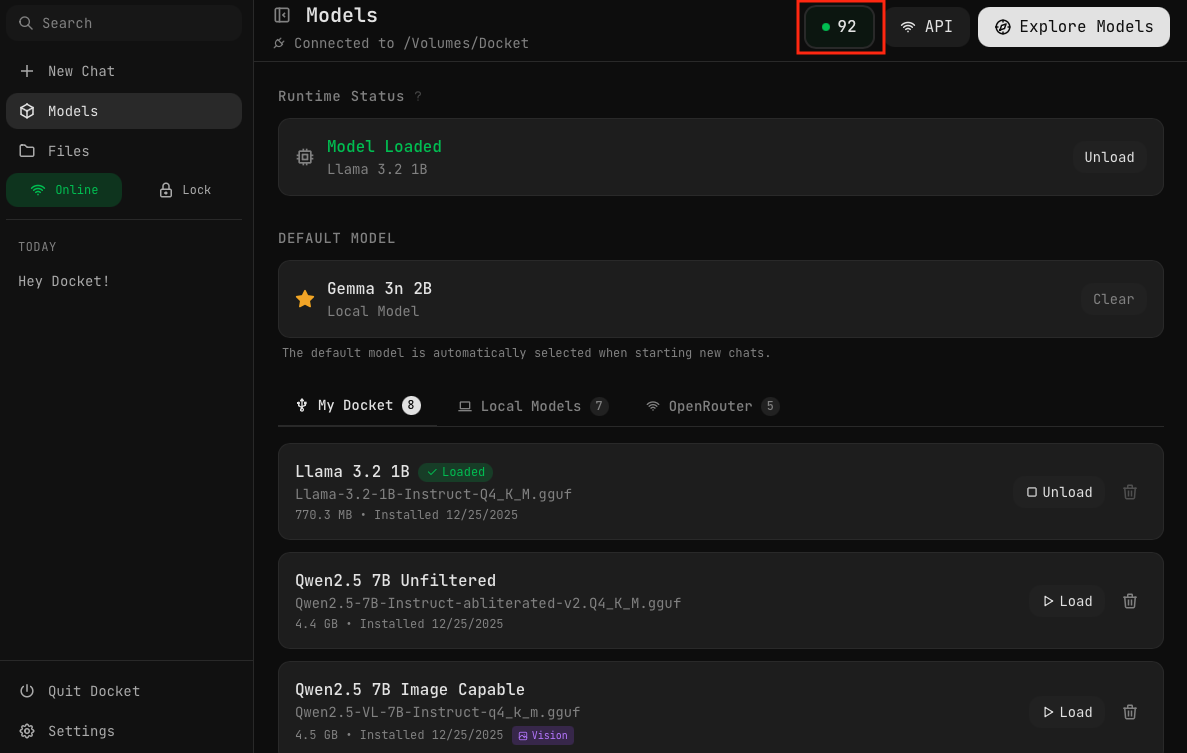
Click the score badge in the upper right corner of the Models page to see your computer's AI capability rating. This score helps you understand what size models your system can handle.
Understanding Your Score
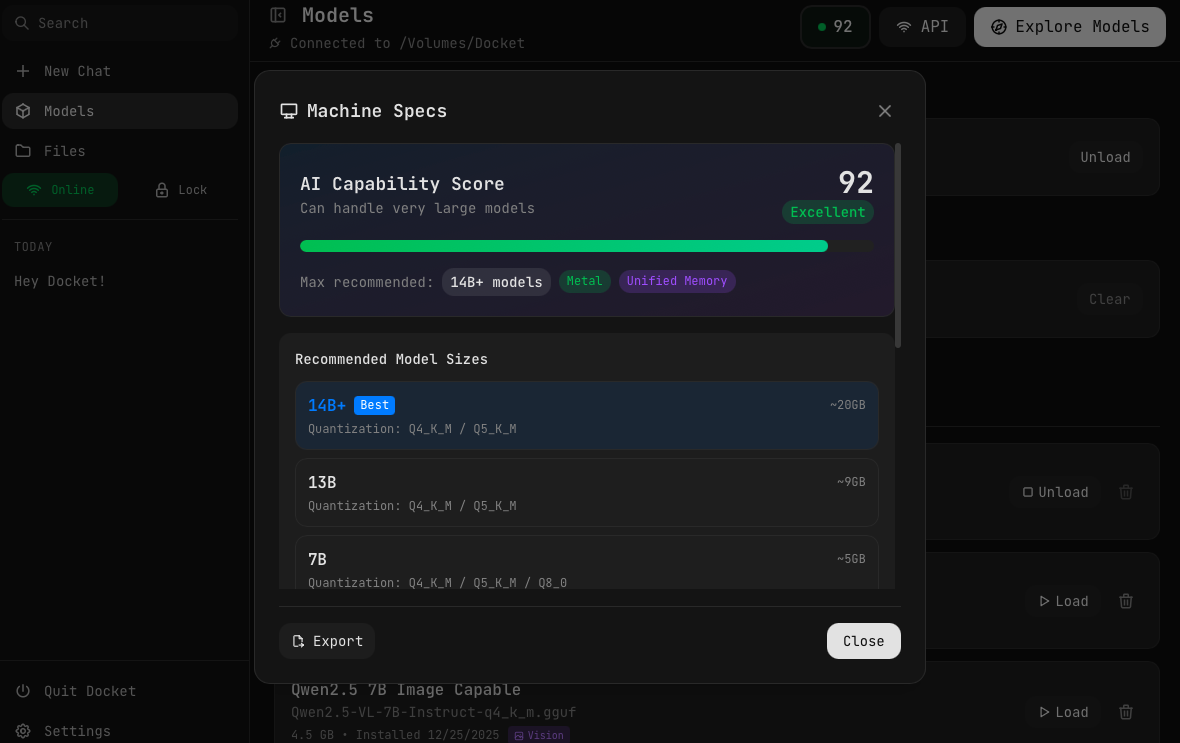
The Machine Specs modal shows:
- AI Capability Score — A rating from 0-100 with labels like "Excellent", "Good", or "Limited"
- Max recommended — The largest model size your system can comfortably run
- Hardware tags — Features like Metal (Apple GPU acceleration) or Unified Memory
- Recommended Model Sizes — Specific size tiers with suggested quantizations and memory estimates
Score Ratings
| Score | Rating | Max Model Size |
|---|---|---|
| 80-100 | Excellent | 14B+ parameters |
| 60-79 | Good | 7-13B parameters |
| 40-59 | Moderate | 3-7B parameters |
| 20-39 | Limited | 1-3B parameters |
| 0-19 | Minimal | < 1B parameters |
Choosing the Right Model
RAM Requirements
As a rule of thumb, you need:
- Model size + 2-4 GB for the operating system and Docket
| Your RAM | Recommended Model Size |
|---|---|
| 4 GB | 1-3B models only |
| 8 GB | Up to 7B (Q4 quantization) |
| 16 GB | Up to 14B comfortably |
| 32 GB+ | Can run larger models or multiple models |
By Use Case
| Task | Recommended |
|---|---|
| Quick Q&A, simple tasks | 3B-7B models |
| Coding assistance | 7B Coder models (Qwen Coder, DeepSeek Coder) |
| Complex reasoning | 13B-14B models |
| Creative writing | 7B-14B models |
| Image analysis | Vision models (Qwen VL, LLaVA) |
Quantization Guide
When downloading models, you'll choose a quantization level. Here's what to pick:
| Quantization | Quality | Size (7B) | Choose If... |
|---|---|---|---|
| Q8_0 | Excellent | ~8 GB | You have 16GB+ RAM and want best quality |
| Q5_K_M | Very Good | ~5.5 GB | You have 12GB+ RAM and want better quality |
| Q4_K_M | Good | ~4.5 GB | Best for most users (Docket default) |
| Q3_K_M | Acceptable | ~3.5 GB | Limited RAM (4-6GB available) |
| Q2_K | Reduced | ~2.5 GB | Very limited hardware only |
Q4_K_M is the sweet spot for most users. It offers excellent quality-to-size ratio and is what Docket's pre-installed models use.
Speed vs Quality
- Smaller quantizations (Q3, Q4) run faster but may have slightly lower quality
- Larger quantizations (Q5, Q8) have better quality but use more RAM and run slower
- For coding and factual tasks, lower quantization is usually fine
- For creative writing, you might prefer higher quality
Recommended Model Sizes
The Machine Specs modal lists model sizes your computer can run, showing:
- Size tier — 14B+, 13B, 7B, 3B, etc.
- Best tag — Indicates the optimal size for your hardware
- Quantizations — Recommended quantization levels
- Memory estimate — Approximate RAM required
On systems with unified memory (like Apple Silicon Macs), larger models can run more efficiently because the CPU and GPU share the same memory pool.
Exporting Specs
Click the Export button at the bottom of the Machine Specs modal to save a detailed breakdown of your system's specifications to your Files. This is useful for:
- Troubleshooting performance issues
- Sharing specs when asking for help
- Comparing capabilities across different machines
Improving Performance
If your score is lower than expected:
- Close other applications — Free up RAM for model loading
- Use smaller quantizations — Q4_K_M instead of Q8_0
- Try smaller models — A fast 7B model often beats a slow 14B model
- Use your computer's SSD — Load models from Local Models for faster loading
Next Steps
- Pre-installed Models — See what comes with Docket
- Hugging Face Browser — Download additional models
- Models & Quantization — Learn what these terms mean